Mbed CE startup project failed using VsCode

Thank you for your response.
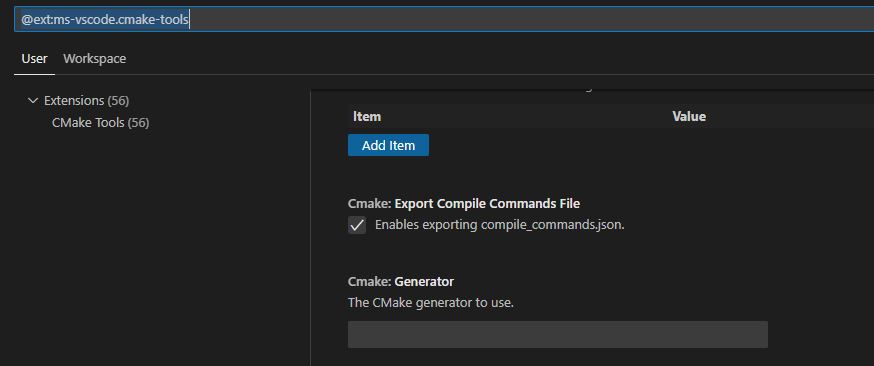
That is the reason why I am asking. I was among the first who used this guide few months ago. So I want to understand the differences because how I wrote above I have installed this on two workstations according to same guide, both are working as expected without the need to fill the generator settings.

BR, Jan

Maybe it has to do with other programs installed on the system? Like, if mingw32-make and/or MSVC are present on the computer, it might choose them by default in some circumstances.

Right to te point Jamie, some weeks ago I tryed mbed-cmake and in the toolchain setup wiki you pointed to mingw32-make first as the make tool, I did so, probably it has been the root cause.

Thank you

how to fix it?

[proc] Executing command: "C:\Program Files\CMake\bin\cmake.EXE" --version
[proc] Executing command: "C:\Program Files\CMake\bin\cmake.EXE" -E capabilities
[variant] Loaded new set of variants
[kit] Successfully loaded 3 kits from C:\Users\Administrator\AppData\Local\CMakeTools\cmake-tools-kits.json
[proc] Executing command: "C:\Program Files\CMake\bin\cmake.EXE" -SD:/mbed-ce-hello-world -Bd:/mbed-ce-hello-world/build -G Ninja
[proc] The command: "C:\Program Files\CMake\bin\cmake.EXE" -SD:/mbed-ce-hello-world -Bd:/mbed-ce-hello-world/build -G Ninja exited with code: 1
[main] Configuring project: mbed-ce-hello-world 
[proc] Executing command: "C:\Program Files\CMake\bin\cmake.EXE" --no-warn-unused-cli -DCMAKE_BUILD_TYPE:STRING=Release -DMBED_TARGET:STRING=NUCLEO-F303RE -DUPLOAD_METHOD:STRING=STM32CUBE -DCMAKE_EXPORT_COMPILE_COMMANDS:BOOL=TRUE -SD:/mbed-ce-hello-world -Bd:/mbed-ce-hello-world/build -G Ninja
[cmake] Not searching for unused variables given on the command line.
[cmake] -- Mbed: Creating virtual environment with Python interpreter D:/mbed-ce-hello-world/mbed-os/venv/Scripts/python.exe
[cmake] Error: [Errno 13] Permission denied: 'D:\\mbed-ce-hello-world\\mbed-os\\venv\\Scripts\\python.exe'
[cmake] CMake Error at mbed-os/tools/cmake/mbed_python_interpreter.cmake:37 (execute_process):
[cmake]   execute_process failed command indexes:
[cmake] 
[cmake]     1: "Child return code: 1"
[cmake] 
[cmake] Call Stack (most recent call first):
[cmake]   mbed-os/tools/cmake/app.cmake:14 (include)
[cmake]   CMakeLists.txt:12 (include)
[cmake] 
[cmake] 
[cmake] -- Configuring incomplete, errors occurred!
[proc] The command: "C:\Program Files\CMake\bin\cmake.EXE" --no-warn-unused-cli -DCMAKE_BUILD_TYPE:STRING=Release -DMBED_TARGET:STRING=NUCLEO-F303RE -DUPLOAD_METHOD:STRING=STM32CUBE -DCMAKE_EXPORT_COMPILE_COMMANDS:BOOL=TRUE -SD:/mbed-ce-hello-world -Bd:/mbed-ce-hello-world/build -G Ninja exited with code: 1

Hmm maybe creating the venv got interrupted the first time? Try deleting the folder D:\mbed-ce-hello-world\mbed-os\venv\. and then running cmake again.

If that doesn’t work, can you look in D:\mbed-ce-hello-world\mbed-os\venv\Scripts, try to run python.exe, and see what happens?

Also another possible cause of this could be if CMake is finding MinGW64 python rather than a Windows version of python, so double check which one is first in your PATH if you have mingw64 or MSYS2 installed.